KPIs compete
ADR, Occupancy, RevPAR and financial metrics sit side by side without automatically forming a management priority.
Hotel KPI Dashboard & Management Intelligence
Occupancy and RevPAR are rising. Is the operating result improving too? GEN│RAL brings monthly hotel KPIs, commercial variances and data quality into a shared management context.
7 calendar days of full Executive access. After approval, the period starts only upon successful activation or usable data—not upon registration.
For Owners and General Managers
Aggregated hotel KPIs
Rule Engine + Intelligence Layer
7-calendar-day Executive access
01 — THE DASHBOARD PROBLEM
A dashboard becomes a management instrument only when it connects variance, commercial relevance and next step.
ADR, Occupancy, RevPAR and financial metrics sit side by side without automatically forming a management priority.
A change is visible, but whether it matters commercially and requires attention remains unresolved.
Without cause, next step and outcome review, it provides overview but not consistent steering.
02 — MANAGEMENT RELEVANCE
GEN│RAL reduces the distance between metric and decision through a fixed, transparent logic.
Current KPIs form the commercial starting point.
Comparisons and rules mark relevant developments.
Not every signal receives the same management attention.
Up to three robust priorities reduce data overload.
Action and subsequent development remain transparently connected.
03 — THE GEN│RAL COCKPIT
The Cockpit connects Executive Briefing, Dashboard, Health Radar and Alerts with profit and action logic.
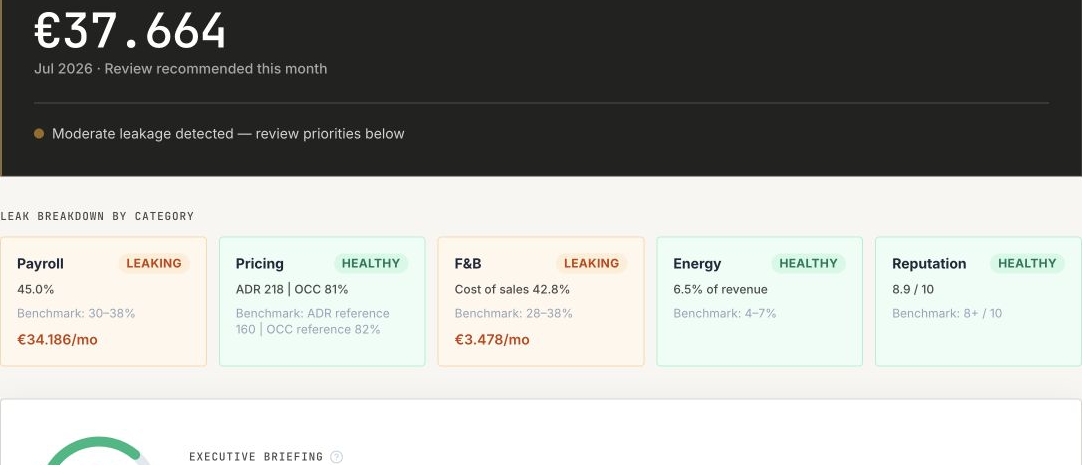
The commercial position and up to three priorities take centre stage.
Metrics are organised within one management framework.
Health Radar and Alerts direct attention to relevant change.
Action Center and Timeline connect the decision and subsequent development.
WHO IT IS FOR
GEN│RAL is built for independent hotels and owner-led hotel groups where commercial clarity must remain close to operations.
FAQ
Occupancy describes room utilisation, ADR the average room rate, and RevPAR room revenue per available room night. GOP and GOP margin add the operating-result view; cost categories help explain variances. GEN│RAL processes aggregated monthly KPIs. Available views and analyses depend on the plan and entered data. A metric without a traceable evidence base must not be treated as a reliable recommendation.
ADR = room revenue ÷ room nights sold. Occupancy = sold room nights ÷ available room nights × 100. RevPAR = room revenue ÷ available room nights; with consistent definitions it also equals ADR × occupancy expressed as a decimal. All inputs cover the same period and room inventory. A zero denominator makes the metric undefined. F&B revenue is not included in room revenue for ADR or RevPAR. Metric definitions from STR / CoStar.
RevPAR measures room revenue. GOPPAR divides the hotel’s operating profit by available room nights in the same period: GOP ÷ available room nights. The operating-result view therefore reflects costs and other operating departments too. GOPPAR is explained here as a comparison metric, not as a promise of an additional dashboard field in every plan. Neither RevPAR nor GOPPAR is a liquidity measure.
Synthetic example, not customer data: 50 rooms available throughout 30 days provide 1,500 available room nights. With 1,200 room nights sold and €120,000 room revenue, occupancy is 80%, ADR is €100 and RevPAR is €80. If separately established GOP is €30,000, GOPPAR is €20. Without cost and total-revenue data, the €80 RevPAR reveals neither GOP margin nor net profit. The example assumes the same period and consistent revenue definitions throughout.
First check period, available room nights, seasonality and completeness. A longer period can produce more revenue without improving performance per room night. High occupancy with a falling ADR needs a different investigation from rising RevPAR with disproportionate costs. A benchmark is a comparison basis, not automatically a realistic savings target. GEN│RAL supports the interpretation; management checks the operating context. Treat benchmark variances as an investigation brief.
No. GEN│RAL adds commercial relevance, prioritised management points and next steps to reporting and BI.
After a monthly report is entered or corrected. V1 analyses monthly periods, not separate weekly periods.
No. AI explains and structures approved data. Critical calculations follow fixed rules and management decides.
Yes. A 7-calendar-day Executive Trial is available after personal approval. It starts only upon successful activation or once usable data is available.
THE NEXT COMMERCIAL STEP
7 calendar days of full Executive access from successful activation or once usable data is available. The request is non-binding and currently triggers neither payment nor a subscription.
Request Executive Trial